
FastRawViewer 2.0.11 Release
Mid-Fall Sale!
All LibRaw Products and Bundles - 25% off
Our Special Prices are valid until October 27, 2026.
This is a rolling update with new camera/new raw format support, bugfixes, and some features added.
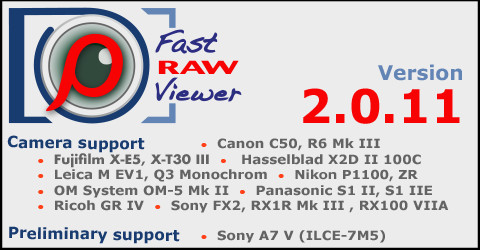
Camera support
- Canon EOS C50, EOS R6 Mark III
- Fujifilm X-E5,X-T30 III
- Hasselblad X2D II 100C
- Leica M EV1, Q3 Monochrom
- Nikon Coolpix P1100, ZR
- OM System OM-5 Mark II
- Panasonic DC-S1 IIE (DC-S1M2E), DC-S1 II (DC-S1M2)
- Ricoh GR IV, GR IV Monochrome
- Sony ILME-FX2, DSC-RX1R Mark III (DSC-RX1RM3), DSC-RX100-VIIA (DSC-RX100M7A)
Preliminary camera support
- Sony A7 V (ILCE-7M5)
- Lossless compressed RAWs are fully supported; Compressed/Compressed HQ RAWs: embedded/external JPEG displayed.
Improvements/bug fixes
- Support for large (>2GB) CRM format movies/CR3 bursts.
- To enable: use EnableCR3Movies hidden settings script (to disable: DisableCR3Movies script)
- Of course there is no video support, the first frame of the video/burst is displayed.
- Experimental/incomplete: detection of baked-in white balance for Canon files (CR2 and CR3)
- To enable/disable: use EnableCanonBakedWBCheck/DisableCanonBakedWBCheck hidden settings scripts.
- Improved handling of corrupted Nikon HE/HE* compressed files.
- Improved reading of xmp blocks from jpeg files
- This is an experimental option that has only been tested in our test environment, so it is possible to fallback to previous version via these hidden setting scripts:
- ModernJPEGXMPReader (default value) - use improved/modern reader
- LegacyJPEGXMPReader - use old (legacy) reader
- New setting: Preferences - XMP - XMP tag for Title: According to IPTC specifications, Headline is more suitable for FRV's 'Title' because IPTC's Title is a 'human readable reference, usually a file name', while Headline is a 'brief synopsis'.
- However, for compatibility with previous versions of FRV (and XMP files created by those versions), the default value for this setting is dc:title.
- dc:title - write FRV 'XMP Title' into XMP's dc:title tag.
- photoshop:Headline - write XMP Title into photoshop:Headline tag
- Turning off the 'Handle RAW+JPEG together' setting turns off the 'Join RAW+HEIC' setting too.
- New view mode: Menu - View - Invert Colors
- Inverts image colors in single view mode (just (r,g,b) = 1.0-(r,g,b) in linear mode before display color profile and gamma correction applied).
- Intended (mostly) for quick-n-durty inspection of film negative scans, but color mask is not subtracted so colors are not accurate.
- For RAW scans (DNG): Auto white balance will give the best result. For TIFF/JPEG scans: WB is not available.
- Shortcut: not assigned by default, use Menu - Customize - Keyboard Shortcuts - Image Display section to assign shortcut.
- There is no indication of this mode in the bottom bar, only checkmark in menu item.
- This display mode is restored on FRV restart if Preferences - Interface - Restore last View settings... is checked.
- Auto-ETTR settings: the number of significant digits has been increased in 'Saturate up to' setting to allow values between 0.0 and 0.1
- Auto-ETTR settings: new 'Manual Adjust' setting in ETTR/Autoexposure section.
- The value of this setting is added to the calculated auto-exposure value.
- Notes:
- If calculated value (Auto-correction plus adjustment) is negative: zero correction is applied
- All calculations are performed before 'Adobe hidden exposure' (BLE) shift is applied to displayed correction value.
- New action/menu item: Select -> Append Selection to file:
- No standard shortcut, can be assigned in the usual way (in the "File Selection for Batch" section of the shortcut editor)
- If a selection has not been saved during the current session, a standard file selection dialog opens.
- If a save was made during the current session, the last used file will be appended (with visual feedback).
- Added the Selection - Reset last used selection save file on folder change setting, enabled by default. If enabled, the last file used for saving is reset (forgotten) when the current folder is changed.
- Preferences - File operations section is split into two because it has become too big.
- The DSC file extension has been removed from the list of standard file extensions recognized by FRV.This extension was used by some very old and rare Kodak cameras. Also, a file with this extension (containing no images) is written to the root folder of a memory card by Nikon cameras.As a result, visiting memory card root folder in FRV results in a file decoding error. If you still have RAW files with this extension, add *.dsc to the Preferences - File Handling - Additional RAW extenstions setting.
- New setting: Preferences - File Operations - Copy/Move filename confict resolve with options:
- Ask user: ask user on every conflict (default)
- Auto resolve: destfolder/filename-(N).ext will be created on confilct with destfolder/filename.ext
- Replace target: old file in the destination folder will be replaced with the new one
(note: if destination file is read-only/locked, then additional user prompt will appear). - Skip copy/move: copy/move will not be performed for the conflicting file(s) without an additional confirmation.
- Stop copy/move: copy/move will be stopped without an additional prompt
Note: this setting affects copy/move operations only; filename conflicts on file rename are handled according to rename dialog setting.
- New setting: Preferences - Other - Extra messages mask, enables additional (very specific) messages to Debug log.
- New hidden setting AutoScrollToActiveItem, enabled by default.
If disabled: Filmstrip/Grid will not scroll to an active item after filtering applied or filtering data (e.g. rating/label) changed.
To disable/enable: use DisableAutoScrollToActiveItem/EnableAutoScrollToActiveItem hidden settings script - Bugfix: if Image Display - Exposure - Apply Adobe hidden exposure correction setting is off and XMP - Exposure, Contrast, WB - Force Adobe software to match FastRawViewer brightness setting is on, and the exposure information is taken from an XMP file in Adobe settings section, then the Adobe correction (hidden exposure compensation) was not added to the exposure value.
Download Links
Please visit this site download page.
