
File Copy error
Forums:
I keep getting "File copy error" message in a popup window when trying to delete files (i.e. move to _rejected folder) in grid view. No files are marked as read-only. Intermitent error, sometimes it works sometimes it displays the error message.
OS: fully up to date Windows 10
FRV version 2.0.10
Hardware: High spec PC with Intel I9, 128GB RAM, Nvidia RTX 4070 Ti graphics card. Internal hard drives with plenty (2TB plus) of free disk space.
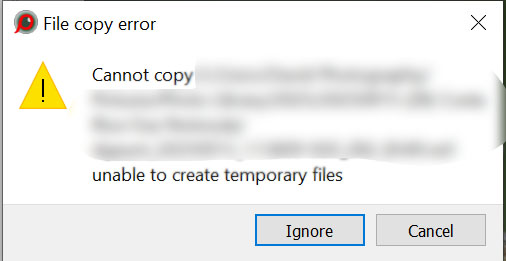
Any suggestions how to fix this?
LibRaw
Fri, 10/03/2025 - 09:34
Permalink
Could be not enough space on
Other than not enough space on the destination volume, could be write protection / read-only or other permissions conflict.
Ad Astra
Fri, 10/03/2025 - 11:52
Permalink
Thanks for the reply. It is
Thanks for the reply. It is not a disk space issue as there are 2 TB of free disk space. Also not a read-only issue as I checked that. When it fails simply repeating the same delete operation works. Seems to be an issue with FRV as it is intermitent fails then works.
LibRaw
Sat, 10/04/2025 - 04:10
Permalink
We have no complaints of this
We have no complaints of this sort, none. Please check your hardware, or it could also be an anti-virus getting in the way.
Joe Lipski
Fri, 12/26/2025 - 09:26
Permalink
I have seen this error. As a
I have seen this error.
As a software engineer, I took note of what was happening on the system at the time of the error. I have a slower SSD drive where I was copying data to it. It started to slow down due to all the IO on the disk and overheating. I was also running Fast Raw Viewer at the same time and culling images. I went to copy and/or move images and I got this warning. My guess is that there is a timeout in the code when it goes to create the temporary file that was being reached before the OS could return the temporary file and throwing this error. The drive had sufficient space and when I retried a few seconds later it worked fine. This was on windows.