FastRawViewer: questions, suggestions, feature requests.
Submitted by Lewis Levin on Sat, 04/02/2016 - 18:52
The documentation says that XMP is never written to jpeg because of the risk of confusion/duplication in the case of RAW+JPEG. Of course, whenever an identically named raw and jpeg file exist in a folder this problem exists.
Submitted by Lewis Levin on Tue, 03/29/2016 - 16:48
Hard to avoid featuritis. You'll end up like Photo Mechanic, which is a good but complex product. Inevitable.
I want tiff file support.
(and someone else wants yet something else!)
I could also want recursive folder opening, e.g., find all the pics. But, this has complexity: it's one thing when there are just 2 more levels, no more than 20 total folder, and no more than 250 images. But, if it happened when you opened "Pictures" that would be a problem!
So, tiff higher priority than recursive folders.
Submitted by ERD on Wed, 03/23/2016 - 19:10
Hi,
I would like to use FRV to rate my files before I import them into LR (Adobe Lighroom CC). But I have difficulties getting my FRV ratings over into Lightroom.
Here is what I do:
- Rate all photos in FRV
xmp files get created for each rated photo.
- Import all photos into LR (Lightroom)
- Select all photo in LR and execute Metadata > Read metadata from file
Some of the ratings I did in FRV, appear in LR, some not.
Thanks for your help.
Erol
Submitted by allfive on Wed, 03/23/2016 - 13:29
New to FRV.
Does the user manual indicate how to determine DR of various high ISO (1600, 3200, 6400) RAW images?
Submitted by Sundance on Sat, 03/19/2016 - 13:47
Submitted by Peter Gallagher on Fri, 03/18/2016 - 20:35
I am trying to integrate RPP into my workflow in place of ACR, so the creation of ".rpps" files from FRV is of great interest.
But I can't seem to make this work. I have a "default" profile in RPP that uses a color-correction profile (created with ColorChecker24) for my camera but sets the WB to a simple default (1.00, 0.5, 0, 0 EV for RB and G+G).
I have set FRV 1.3 to display the WB in EV so I know what EV values FRV sets for each channel. I have also chosen to allow FRV to set auto-exposure (not Adobe-like). [By the way I really like the new exposure controls/curves].
Submitted by Peter Gallagher on Fri, 03/18/2016 - 01:08
Greetings,
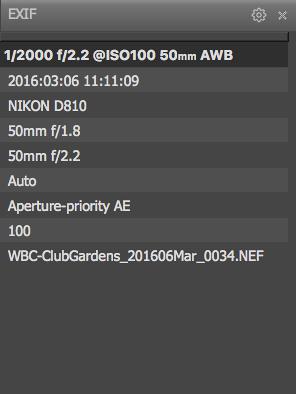
No matter how many or few (even 'default') fields I set in the Exif panel dialog, FRV displays only nine, and the same nine all the time. Exposure, WB, Date, Camera, Lens and Apperture, "program" (i.e. AE), ISO and Name.
I want to see the "User Comments" field that Exiftool shows has content in the file (a NEF raw file) and the Copright info. I have set the appropriate tick-box in the panel preferences dialog. But, no luck.
Submitted by laumansm on Sat, 03/05/2016 - 18:20
Hi there,
I shoot Raw+jpg with my Fuji X-T1. It appears to me that FRV does not apply the rating that I apply to my RAWs to the corresponding jpg automatically. I have to rate jpgs separately. Is this something that I can turn on? Thanks so much, Marius
Submitted by agcphoto1 on Wed, 03/02/2016 - 15:28
This might be a bug, but I'm new to this kind of thing...
I was using preferences to change the appearance of the bottom bar.
The R,G,B,BW icons do not show up, regardless of the option I select.
There does appear to be a very small space on the bar that might be intended to accommodate the.
I am using a 27" iMac, so there is plenty of room in the bottom bar to show whatever I think I might need.
Thank you for your help
Submitted by agcphoto1 on Sun, 02/28/2016 - 14:13
FastRawViewer (FRV) saves changes to the RAW file to an XMP file. I have noticed that PS CC2015 imports those changes when I send a file y using the "Run" command. When I send a file to DxOOptics Pro, it appears that those are not opened. Is there a way to have DxO open the file and use the adjustments that were made in FRV? Thank you.
Pages

